Golem 1.5 features - Part 3: MCP
Posted on
Introduction
I am writing a series of short posts showcasing the new features of Golem 1.5, to be released at the end of April, 2026. The episodes of this series will be short and assume the reader knows what Golem is. Check my other Golem-related posts for more information!
Parts released so far:
- Part 1: Code-first routes
- Part 2: Webhooks
- Part 3: MCP
- Part 4: Node.js compatibility
- Part 5: Scala support
- Part 6: User-defined snapshotting
- Part 7: Configuration and Secrets
- Part 8: Template simplifications and automatic updates
- Part 9: Agent skills
- Part 10: WebSocket client
- Part 11: Bridge libraries
- Part 12: REPL
- Part 13: Per-agent configuration
- Part 14: OpenTelemetry
- Part 15: MoonBit
- Part 16: Quotas
- Part 17: Semantic retry policies
MCP
MCP (Model Context Protocol) became a standard way to connect AI applications. With the new Golem release any Golem application can be automatically exposed through MCP. It does not require any code written, MCP is available for any agent automatically, but it needs to be enabled in the application manifest:
Enabling
The same way how we can deploy HTTP APIs with the application manifest, we can add an mcp section and choose which agents to deploy to which subdomains per environment:
mcp:
  deployments:
    local:
      - domain: mcp-demo.localhost:9007
        agents:
          CounterAgent: {}
Security
The above manifest section already exposes the listed agent through MCP, but it is not protected by any form of authentication. Similar to how we can protect HTTP endpoints with OAuth, we can attach a security scheme to our MCP deployment, let's call it mcp-oauth:
mcp:
  deployments:
    local:
      - domain: mcp-demo.localhost:9007
        agents:
          CounterAgent:
            securityScheme: mcp-oauth
To set that up we need an OAuth provider and have to create a security scheme using the golem CLI. The provider can be one of the common ones like Google, etc., or any custom one. In this post we are going to use the mock-oauth2-server docker container:
docker run -d \
  --name "golem-mock-oauth2" \
  -p "9099:8080" \
  ghcr.io/navikt/mock-oauth2-server:2.1.10

CLIENT_ID="golem-mcp-client"
CLIENT_SECRET="golem-mcp-secret"
REDIRECT_URL="http://mcp-demo.localhost:9007/mcp/oauth/callback"

golem -L api security-scheme create \
  --provider-type custom \
  --custom-provider-name "mock-oauth2" \
  --custom-issuer-url "http://localhost:9099/golem" \
  --client-id "${CLIENT_ID}" \
  --client-secret "${CLIENT_SECRET}" \
  --scope openid \
  --scope email \
  --scope profile \
  --redirect-url "${REDIRECT_URL}" \
  mcp-oauth
With that set, and running golem deploy, our MCP server is ready to be used at http://mcp-demo.localhost:9007/mcp using streamable HTTP protocol, authenticated by the mock OAuth2 server.
Demo
We can prove this by simply creating the default template (which simply implements a stateful counter), let's use the Rust one for this example and modify it slightly:
#[agent_definition(mount = "/counters/{name}")]
pub trait CounterAgent {
    // The agent constructor, its parameters identify the agent
    fn new(name: String) -> Self;

    #[description("Increment by a given number")]
    fn increment_by(&mut self, n: u32) -> u32;
}

struct CounterImpl {
    _name: String,
    count: u32,
}

#[agent_implementation]
impl CounterAgent for CounterImpl {
    fn new(name: String) -> Self {
        Self {
            _name: name,
            count: 0,
        }
    }

    fn increment_by(&mut self, n: u32) -> u32 {
        self.count += n;
        self.count
    }
}
We replaced the default increment method with a parametrized increment_by, which is going to be mapped into an MCP tool in our MCP server automatically.
If we start the MCP Inspector:
npx @modelcontextprotocol/inspector node build/index.js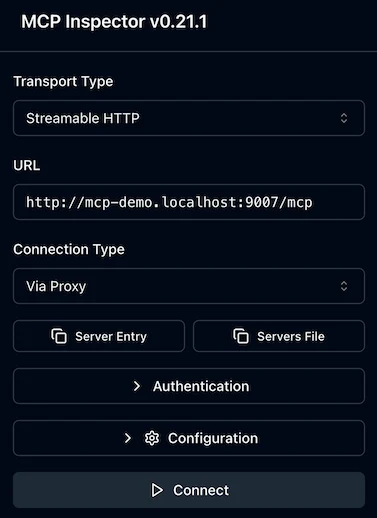
then click on the quick auth flow and connect, we can go to the Tools page and see our counter incrementation tool:
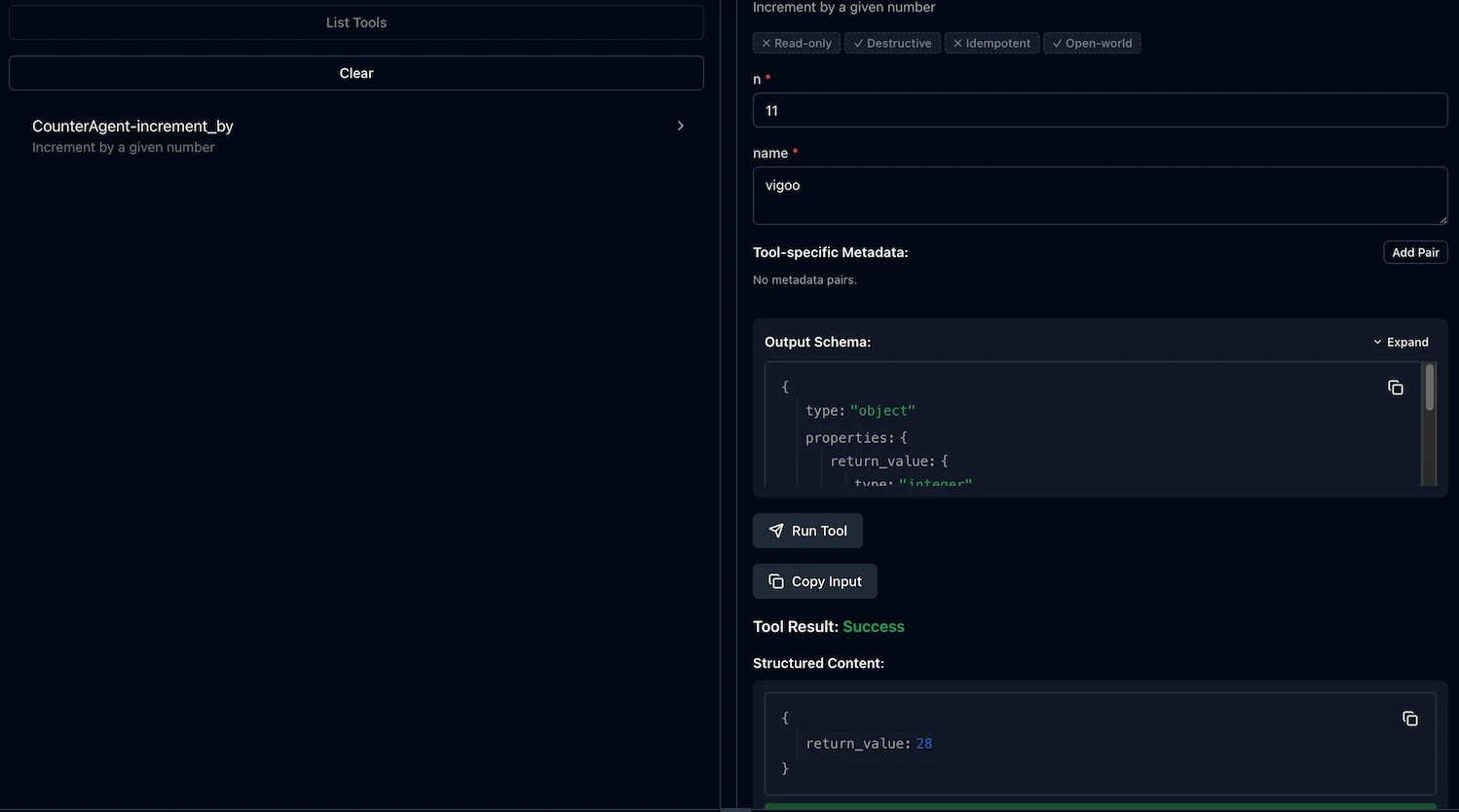
We can pass the Counter agent's constructor parameter, name and the increment_by method's n parameter, and invoke it through an MCP tool.
Mapping
As demonstrated above, increment_by has been automatically exported as a tool. But MCP not only defines tools, but also resources and resource templates. We support these with an automatic mapping in the following way:
| Agent | Method | MCP entity |
|---|---|---|
| Singleton | No parameters | Resource |
| Non-singleton | No parameters | Resource template |
| Any | Has parameters | Tool |
Metadata
For every agent and agent method, we can attach a description and a prompt:
@description("Increments the counter by the number provided in the `n` parameter")
@prompt("Increment by a given number")
async increment_by(n: number): Promise<number> {
  // ...
}#[description("Increments the counter by the number provided in the `n` parameter")]
#[prompt("Increment by a given number")]
fn increment_by(&mut self, n: u32) -> u32;@description("Increments the counter by the number provided in the `n` parameter")
@prompt("Increment by a given number")
def incrementBy(n: Int): Future[Int]///| Increments the counter by the number provided in the `n` parameter
#derive.prompt_hint("Increment by a given number")
pub fn Counter::increment(self : Self, n: UInt32) -> UInt32 {Both are optional, and both are added to the MCP metadata.
Special data types
It's not strictly related to the MCP feature, and not even new in Golem 1.5, but the three special data types supported by all the Golem SDKs are a good match for exposing some special tools and resources through the MCP protocol:
Unstructured text
Any method parameter or return type can be defined as unstructured text. Optionally a set of allowed language codes can be attached to the type:
myMethod(
  anyText: UnstructuredText,
  constrainedText: UnstructuredText<['en', 'de']>
) {
  // ...
}#[derive(AllowedLanguages)]
enum MyLangs { En, #[code("de")] German }
fn my_method(
&self,
any_text: UnstructuredText,
constrained_text: UnstructuredText<MyLangs>
);def myMethod(
anyText: TextSegment[AllowedLanguages.Any],
constrainedText: TextSegment[MyLangs]
)
sealed trait MyLangs
object MyLangs {
case object En extends MyLangs
@golem.runtime.annotations.languageCode("de")
case object German extends MyLangs
implicit val allowed: AllowedLanguages[MyLangs] =
golem.runtime.macros.AllowedLanguagesDerivation.derived
}
#derive.text_languages("constrained_text", "en", "de")
pub fn MyAgent::my_method(
  self : Self,
  any_text : UnstructuredText,
  constrained_text : UnstructuredText,
) -> Unit {
  ...
}
Unstructured binary
Similarly to unstructured text, we can also use unstructured binary parameters and return types, and optionally define the allowed MIME types for them:
myMethod(
  anyBinary: UnstructuredBinary,
  image: UnstructuredBinary<['image/png', 'image/jpeg']>
) {
  // ...
}#[derive(Debug, Clone, AllowedMimeTypes)]
enum Image {
#[mime_type("image/png")]
Png,
#[mime_type("image/jpeg")]
Jpeg,
}
fn my_method(
&self,
any_binary: UnstructuredBinary,
image: UnstructuredBinary<Image>
);def myMethod(
anyBinary: BinarySegment[AllowedMimeTypes.Any],
image: BinarySegment[Image]
)
sealed trait Image
object Image {
@golem.runtime.annotations.mimeType("image/png")
case object Png extends Image
@golem.runtime.annotations.mimeType("image/jpeg")
case object Jpeg extends Image
implicit val allowed: AllowedMimeTypes[Image] =
golem.runtime.macros.AllowedMimeTypesDerivation.derived
}#derive.mime_types("image", "image/png", "image/jpeg")
pub fn MyAgent::my_method(
self : Self,
any_binary : UnstructuredBinary,
image : UnstructuredBinary,
) -> Unit {
...
}Multimodal
Finally there is a special parameter type called multimodal, which is a special way to define methods (tools) that can work on multiple types of input. The default multimodal type just allows pasting either text or binary, but it is fully customizable with the above defined language and MIME type constraints, and can also include structured data. By using multimodal types, and not just modelling the same input using custom data types, Golem can map these definitions better to MCP concepts.
The simplest version just accepts either an arbitrary text, or an arbitrary binary:
textOrBinary(input: Multimodal) { ... }fn text_or_binary(&self, input: Multimodal) -> Multimodal { input }def textOrBinary(input: MultimodalItems.Basic): Future[MultimodalItems.Basic]pub fn MyAgent::text_or_binary(
self : Self,
input : @types.Multimodal[TextOrBinary],
) -> String { ... }We can add a third option in the form of a structured data type to this:
type MyStructuredType = { ...}
textOrBinaryOrStructured(input: MultimodalCustom<MyStructuredType>) { ... }#[derive(Schema)]
struct MyStructuredType { /* ... */ }
fn text_or_binary_or_structured(
&self,
input: MultimodalCustom<MyStructuredType>,
) -> MultimodalCustom<MyStructuredType> { input }final case class MyStructuredType(/* ... */)
object MyStructuredType { implicit val schema: Schema[MyStructuredType] = Schema.derived }
def textOrBinaryOrStructured(
input: MultimodalItems.WithCustom[MyStructuredType]
): Future[MultimodalItems.WithCustom[MyStructuredType]]#derive.golem_schema
pub(all) struct MyStructuredType { /* ... */ }
pub fn MyAgent::text_or_binary_or_structured(
self : Self,
input : @types.Multimodal[CustomModality[MyStructuredType]],
) -> String { ... }Or we can fully customize the multimodal behavior by defining our own variant type it maps to:
export type TextOrImage =
  | { tag: 'text'; val: UnstructuredText<['en', 'de'>] }
  | { tag: 'image'; val: UnstructuredBinary<['image/jpeg', 'image/png']> };
fullyCustom(input: MultimodalAdvanced<TextOrImage>) { ... }#[derive(AllowedLanguages)]
enum TextLang { En, #[code("de")] German }
#[derive(AllowedMimeTypes)]
enum ImageType {
#[mime_type("image/jpeg")] Jpeg,
#[mime_type("image/png")] Png,
}
#[derive(Schema, MultimodalSchema)]
enum TextOrImage {
Text(UnstructuredText<TextLang>),
Image(UnstructuredBinary<ImageType>),
}
fn fully_custom(
&self,
input: MultimodalAdvanced<TextOrImage>,
) -> MultimodalAdvanced<TextOrImage> { input }sealed trait TextLang
object TextLang {
@golem.runtime.annotations.languageCode("en")
case object En extends TextLang
@golem.runtime.annotations.languageCode("de")
case object De extends TextLang
implicit val allowed: AllowedLanguages[TextLang] =
golem.runtime.macros.AllowedLanguagesDerivation.derived
}
sealed trait ImageType
object ImageType {
@golem.runtime.annotations.mimeType("image/jpeg")
case object Jpeg extends ImageType
@golem.runtime.annotations.mimeType("image/png")
case object Png extends ImageType
implicit val allowed: AllowedMimeTypes[ImageType] =
golem.runtime.macros.AllowedMimeTypesDerivation.derived
}
final case class TextOrImage(
text: TextSegment[TextLang],
image: BinarySegment[ImageType],
)
object TextOrImage { implicit val schema: GolemSchema[TextOrImage] = /* derived */ }
def fullyCustom(input: Multimodal[TextOrImage]): Future[Multimodal[TextOrImage]]#derive.multimodal
pub(all) enum TextOrImage {
Text(UnstructuredText)
Image(UnstructuredBinary)
}
#derive.text_languages("input.Text", "en", "de")
#derive.mime_types("input.Image", "image/jpeg", "image/png")
pub fn MyAgent::fully_custom(
self : Self,
input : @types.Multimodal[TextOrImage],
) -> String { ... }Remarks
None of these special data types are MCP specific - using them in our agent code is not constraining them to be only called through MCP, they can still be invoked through agent-to-agent communication, mapped to HTTP APIs and so on.